The Human in the Loop Playbook : how to automate complex customer support without losing control
Every Voice AI vendor tells you how many calls their agent handles alone. Almost none tell you what happens when it can’t. That’s the number customers remember. They don’t call back because the bot confirmed an appointment. They call back because they said “cancel” twice and still weren’t understood. This playbook explores that boundary: what Voice AI should do when it reaches the edge of what it can or should handle.
Arpan Shukla · · 14 min read
TL;DR
- Voice AI handles routine calls well. Disputes, suspected fraud, failed authentication and policy exceptions need judgment and authority the AI does not have.
- Human-in-the-loop (HITL) is an architecture, not a "transfer to agent" button. The system detects risk, checks what the AI is allowed to do, and hands over with full context so the customer never has to start again.
- The target is not 100% automation. It is **maximum safe automation, measured by cost per resolved interaction rather than by automation rate.
Human involvement is not a failure of automation
The common assumption in enterprise AI is that success means removing people from the process. That holds until you look at the calls a contact center actually takes.
AI is very good at the predictable ones: appointment confirmations, order and application status, FAQs, reminders, scheduling, and collecting information. These are well-defined workflows with a known right answer.
Then there are the other calls. A customer disputing a transaction. Someone reporting suspected fraud. A caller who cannot get through authentication. A request for an exception to policy. A customer on their fourth attempt at the same problem.
These are not harder FAQs. They involve risk, policy, authority and judgment. So the engineering question is not only "can the AI answer this?" It is "what should happen when the AI reaches the limit of what it is allowed or able to handle?"
That limit is where most of the design work is. Getting a model into production is the smaller part of the job. The workflows, controls, monitoring and escalation paths around it decide whether it can run reliably.
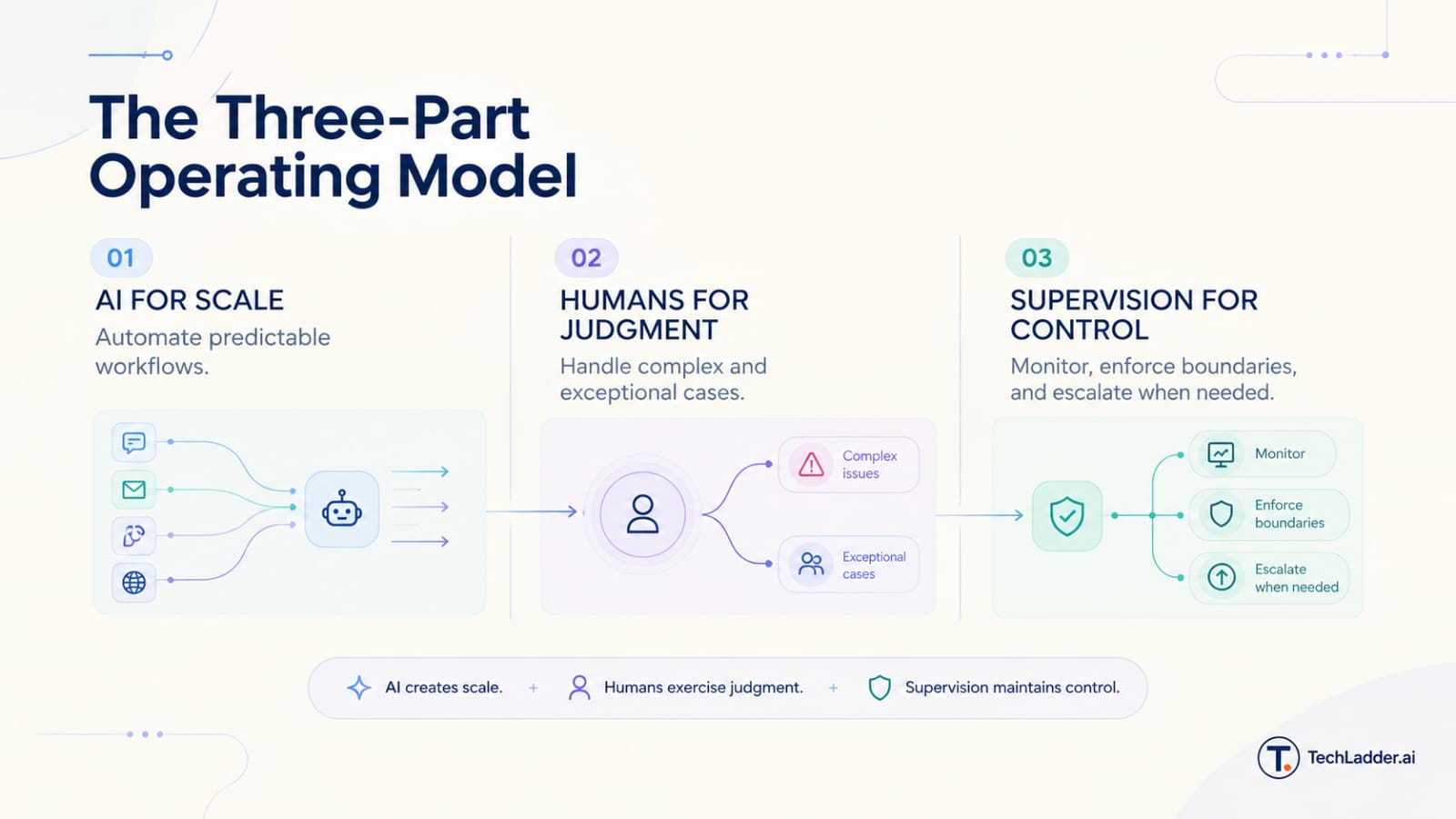
The working model is not AI versus humans. It is AI for scale, humans for judgment, and supervision for control.
What it costs when the AI gets it wrong
To the customer, a support call is one conversation. Behind it sits a stack: telephony, speech recognition, AI models, business rules, authentication, CRM, payments, routing, human agents, compliance and audit. An AI mistake rarely stays inside one sentence.
The confident wrong answer
A customer asks, "Is my refund guaranteed?" The AI misreads the policy and says yes.
The immediate problem is one inaccurate answer. The real cost arrives later: the refund is declined, the customer calls back angry, an agent spends twice as long correcting the record, and the complaint is logged. One wrong sentence has become an operational event.
This is why Voice AI cannot be evaluated on whether its answers sound convincing. You also have to ask what the system does when it is uncertain, wrong, or acting outside its authority.
The trapped customer
Not every failure is a hallucination. Sometimes the system just gets stuck.
Customer : I want to cancel my policy. AI : Sure. Which policy would you like to renew? Customer : No, I said cancel. AI : I can help with renewal. Which policy would you like to renew?
Technically the system is still responding. From the customer's side, it has failed. A dashboard would count this call as "handled by AI".
Automated does not mean resolved. A good system recognizes more than intent. It notices when the conversation itself has stopped making progress: repeated failed attempts, falling confidence, contradictory answers, rising frustration, or a request outside its authority. Escalation for those cases has to be designed in from the start, not added after the complaints arrive.
What human-in-the-loop means in a contact center
Human-in-the-loop means people are a designed part of the system, not an emergency exit. Depending on the workflow, that can mean live monitoring, approval before a sensitive action, full takeover of a call, or review after the fact.
On every turn of a call, a supervised system makes one of four choices:
- Continue. The request is within the AI's authority and confidence is high.
- Clarify. The AI is unsure what the customer wants, so it asks instead of guessing.
- Restrict. The AI understands the request but is not permitted to do it, so it explains the limit and follows the approved path.
- Escalate. The situation needs human judgment, so the call moves to a person with the context attached.
Basic automation asks whether the AI can complete the interaction. Supervised automation asks whether it can complete it safely, and what happens when it cannot.
The three-stage AI-to-human handoff
A handoff should not be a sudden transfer when something breaks. It is a sequence with three stages, and each one can fail on its own.
Stage 1 : Detect when the AI needs help
The system watches the conversation for signals: repeated misunderstanding, frustration, fraud-related language, authentication trouble, sensitive account requests, unusual complexity, or a direct request for a person.
No single keyword should trigger a transfer. A customer who says "fraud" may be asking how fraud alerts work. The system has to read the context before it decides.
This stage also depends on a distinction that is easy to miss. Understanding a request and being allowed to act on it are separate checks. The AI may correctly understand that a customer wants to change the payout account. Whether the AI may make that change is a policy question, and the model should not be the one answering it.
Stage 2 : Route without making the customer wait
A slow handoff feels broken even when the AI itself responds quickly. The delay the customer experiences is the sum of speech recognition, model processing, the escalation check, call routing, finding an available agent, and loading the customer record.
AI response time and total handoff time are different numbers. Measure the second one. Keep the call alive, keep its state, choose the right team rather than the general queue, and tell the customer what is happening while it happens.
Stage 3 : Brief the human
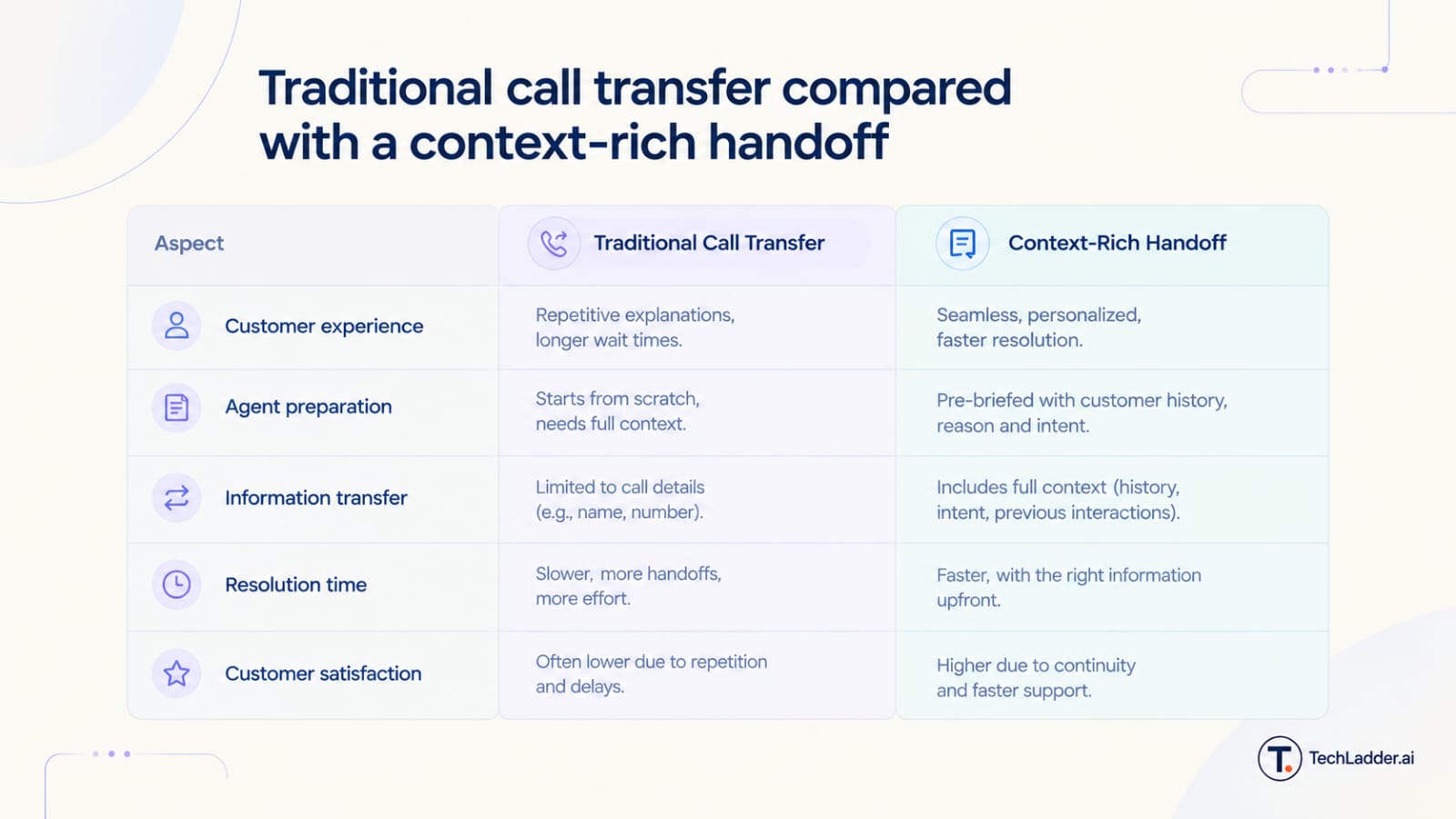
This is where most basic systems fail. The AI says "let me transfer you", the agent answers "hello, how can I help?", and the customer explains everything again.
A proper handoff gives the agent a short brief before they speak:
- what the customer wants
- a summary of the conversation so far
- what the AI already tried
- why the call was escalated
- authentication status and any relevant account details
- signs of frustration or risk
- what still needs to be done
The rule is simple: transfer the context, not just the call. The human becomes the next informed participant in the same conversation.
What sits behind a supervised call
A reliable HITL system is not one AI model. It is several components with separate jobs, and the separation is the point.
| Component | Its job | Why it matters |
|---|---|---|
| Voice and telephony | Carries the call, routes it, performs transfers | A strong model on slow or unreliable call infrastructure still gives a poor experience |
| Speech-to-text | Turns audio into a transcript in real time | Every later decision rests on it. Errors and delay here spread downstream |
| AI agent | Holds the conversation, retrieves information, calls tools | It can understand a request without having the final say on it |
| Conversation analysis | Tracks intent, progress and sentiment | Catches loops and frustration that a single-turn view misses |
| Policy and risk engine | Decides whether the AI may proceed | Keeps authorization out of the language model |
| Handoff and context layer | Routes to the right person with a brief | Makes the human the next informed participant |
| Supervision and audit | Shows what is happening and records why | Makes the system something a team can operate and improve |
Oversight is one control layer, not the only one
Some workflows need stronger controls by nature: payments, healthcare information, personal data, identity verification, account recovery, and policy exceptions. The exact requirements depend on the organization, the jurisdiction and the regulations that apply.
Putting a human in the loop does not make a workflow compliant by itself. Human oversight is one layer in a larger control architecture.
[image: Six enterprise AI control layers: AI model, business rules, authorization, guardrails, human oversight, auditability]
The NIST AI Risk Management Framework describes trustworthy AI as valid and reliable, safe, secure and resilient, accountable and transparent, explainable and interpretable, privacy-enhanced, and fair. It also asks organizations to define roles and responsibilities for human oversight of AI systems. Human oversight should strengthen the other controls, not stand in for them.
One principle matters more than the rest: a prompt is not an authorization boundary. If the AI must not issue refunds above a limit, that limit belongs in the system that issues refunds. An instruction in the prompt is a request to the model. A permission check is a control.
The ROI math: why supervised AI beats all-or-nothing automation
The business case for HITL is not "AI is cheaper than humans". It is that the cheapest call is the one that gets resolved the first time.
The metric that captures this is cost per resolved interaction :
\text{Cost per resolved interaction} = \frac{\text{Total operating cost}}{\text{Interactions actually resolved}}
Automation rate tells you how many calls the AI touched. This metric tells you what it cost to solve a customer's problem, including the calls that came back.
Here is a worked example for 100,000 interactions a month. The inputs are illustrative. Replace them with your own.
| Humans only | Maximum automation | Supervised automation | |
|---|---|---|---|
| Calls the AI takes | 0% | 90% | 70% |
| AI resolves, of the calls it takes | n/a | 70% | 95% |
| Escalated to a human with context | 0% | 0% | 30% |
| Failed AI calls that come back | 0 | 27,000 | 3,500 |
| Total monthly cost | $600,000 | $316,500 | $221,250 |
| Interactions resolved | 92,000 | 95,150 | 97,375 |
| Cost per resolved interaction | $6.52 | $3.33 | $2.27 |
Assumed unit costs: $0.60 for an AI-handled call, $6.00 for a human-handled call, $5.10 for a call escalated with context (the AI portion plus a shorter human portion), and $7.50 for a repeat contact after a failed AI call. Humans resolve 92% of first contacts, 93% of calls handed over with context, and 85% of repeat contacts. Every failed AI call is assumed to come back once.
The maximum-automation model sends 90% of calls to the AI, including ones it should not take. It fails on 27,000 of them, and each failure returns as a longer, angrier call to a human who starts from zero.
The supervised model automates fewer calls. It still costs about 30% less in total and about a third less per resolution, and it resolves more interactions. The saving comes from the 23,500 failures that never happen.
The direction of this result is what matters, not the specific figures. An AI that handles 90% of calls but creates rework, complaints and repeat contacts can be worth less than one that handles 70% and resolves them reliably.
Running it : measure, supervise, control, improve
When should the AI escalate?
No single escalation policy fits every business. The right one depends on risk, regulation, customer expectations, what the AI can do, and how many agents are available. A workable starting point :
| Situation | Right response |
|---|---|
| Routine request, clear intent, within authority | AI continues |
| Ambiguous request, low risk | AI asks a clarifying question |
| Clear request the AI is not permitted to perform | AI explains the limit and follows the approved path |
| Two or more failed attempts at the same step | Escalate |
| Suspected fraud, failed authentication, high-value financial request | Escalate |
| Policy exception or sensitive healthcare conversation | Escalate |
| Strong frustration, or a cancellation signal | Escalate |
| Customer asks for a person | Escalate |
A difficult call is not automatically an escalation. If everything goes to a human, you have added an AI layer in front of the same human-heavy process.
What to measure
Track resolution rate, escalation rate and its reasons, repeat contacts, total handoff time, handling time after handoff, customer satisfaction, policy violations, and human interventions. Watch them together. A falling escalation rate with rising repeat contacts means the AI is holding on to calls it should release.
What the audit trail should hold
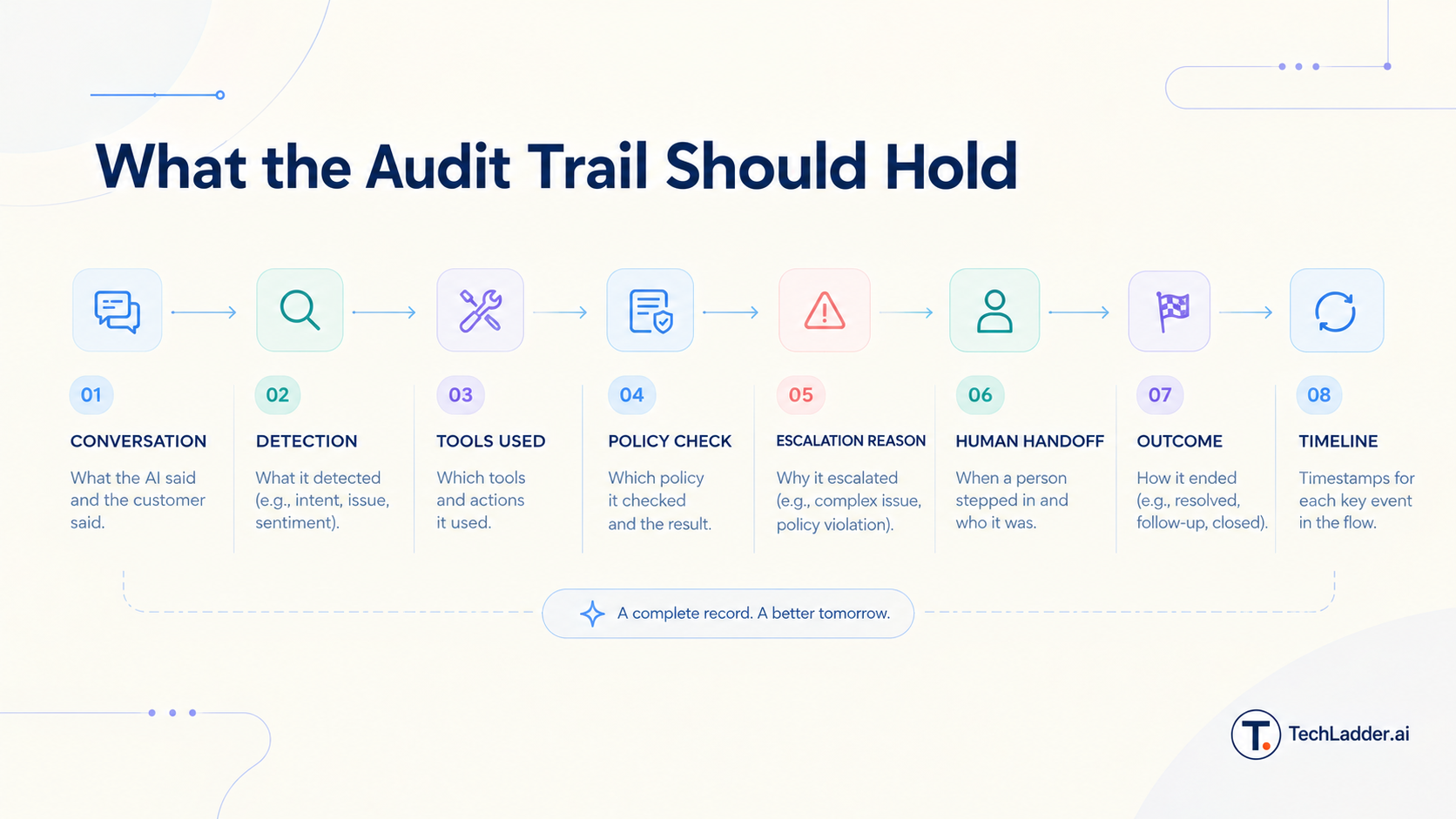
When a call fails or escalates, the team should be able to reconstruct what the AI said, what it detected, which tools it used, which policy it checked, why it escalated, when a person stepped in, and how it ended. Without that record, improving the system is guesswork.
Do not fix every failure with a prompt
When something goes wrong, the first question should not be "how do we change the prompt?" The cause may be a bad tool response, an outdated business rule, poor retrieval, wrong routing, authentication logic, a missing integration, or a policy that changed last week.
Find the actual cause, change the component responsible, test the change against recorded cases, then release and monitor it. That discipline is the difference between an engineered system and endless prompt editing.
How to start
- Pick one predictable, high-volume workflow. Do not start with the whole contact center.
- Write down what the AI may do, what it may not do, and what needs approval.
- Define the escalation triggers and the contents of the handoff brief.
- Enforce the limits in the systems that perform the actions.
- Turn on monitoring and the audit trail before launch, not after.
- Review escalations weekly, fix root causes, and widen the AI's scope as the numbers support it.
How TechLadder approaches it
TechLadder treats customer support as one system in which AI, people and business workflows work together. The platform has three connected parts.
Voice. AI agents handle inbound and outbound calls in real time. They understand requests, use the information they are permitted to access, and carry out approved actions, inside clear limits on what they may do.
Supervise. Teams monitor AI-driven conversations as they happen, see which ones need attention, and step in when judgment is needed. They can see what the AI did, why a call was escalated, and where something went wrong.
Orchestrate. A conversation rarely ends when the call does. Orchestrate connects it to what happens next: a follow-up, another workflow, or an action in a connected business system.
Voice handles the conversation. Supervise provides visibility and control. Orchestrate connects the conversation to the rest of the business.
The question for an enterprise is no longer "can we automate customer support?" It is "how much can we automate safely, with people in control where it counts?"
[Book a demo] · [Explore the TechLadder Voice AI platform]
FAQ
What is human-in-the-loop AI customer support?
It is a way of running AI in customer support where the AI handles suitable interactions and people monitor, approve, or take over when defined conditions are met. The system sets clear limits on what the AI may do alone.
Does HITL mean every AI call goes to a human?
No. The AI completes routine, low-risk calls by itself. People step in only when a trigger fires, such as repeated misunderstanding, a high-risk request, a policy exception, or a direct request for a person.
What information should move with an AI-to-human handoff?
The customer's intent, a summary of the conversation, what the AI already tried, the reason for escalation, authentication status, and what is still open. The agent should be able to continue without asking the customer to repeat anything.
How is AI supervision different from call-center QA?
Traditional QA reviews a sample of calls after they end. AI supervision gives visibility during the call, so a team can spot risk and step in while the customer is still on the line.
Does HITL make Voice AI more expensive?
Usually the opposite. Human time is spent only on the calls that need it, and fewer failed AI calls come back as repeat contacts. Cost per resolved interaction is the number to compare.
Can HITL eliminate AI mistakes?
No. It gives you ways to detect problems, escalate them, step in, and fix the cause. It reduces the cost of mistakes. It does not make the AI infallible.
How should an enterprise start with supervised Voice AI?
Start with one predictable workflow. Define the AI's limits, the escalation triggers and the handoff brief, then monitor the results. Widen the scope as the system proves reliable.
Tags: Voice AI, Human-in-the-Loop AI, AI Customer Support, AI Supervision, Customer Support Automation, AI-to-Human Handoff